What I Learned About Validating Requirements
ROLE & TEAM
Product Designer at Schedaero. Worked with a PM, 2 iOS Engineers, and API Engineers.
SUMMARY
I designed a passkey-based identity verification system for flight logs to meet FAA compliance requirements—but we built the wrong solution because we didn't validate our interpretation of the regulation early enough. This project taught me how to approach regulatory design differently: validate assumptions with experts first, trust my gut when workflows feel too complex, and take ownership of research even when it's not "my job."
Problem Statement
Our customers were asking us to help them comply with FAA regulation A025, which governs how aviation records can be stored electronically. The regulation is dense, technical, and ambiguous—it's written in a way that leaves a lot open to interpretation, and ultimately it's up to each company to work with their Principal Operations Inspector (POI) to get their software approved.
Customers weren't just asking us to make the system compliant—they wanted us to help them document and prove compliance to their POI. This meant we needed to deeply understand the regulation and build features that would satisfy both the letter and the spirit of the law.
My PM and I carefully read through the regulation together. One section stood out: it referenced "electronic signatures" as a requirement for certain records, separate from the rest of electronic recordkeeping. We interpreted this to mean we needed to store a digital signature alongside each flight log—something verifiable, secure, and auditable.
Looking back, this is where things started to go sideways.
Project Goals
Design a system that met FAA A025 requirements for electronic records and signatures
Make the solution work on both iOS (where pilots submit logs) and web (where admins review and edit logs)
Create a reusable pattern that could be applied to other forms beyond flight logs
Provide customers with documentation to help them get Schedaero approved by their POI
Key Focus Areas
How might we meet the FAA's requirements for electronic signatures?
How might we make the signing process work seamlessly across iOS and web?
How might we handle edge cases like shared accounts and multiple devices?
How might we create a reusable pattern that could scale to other forms?
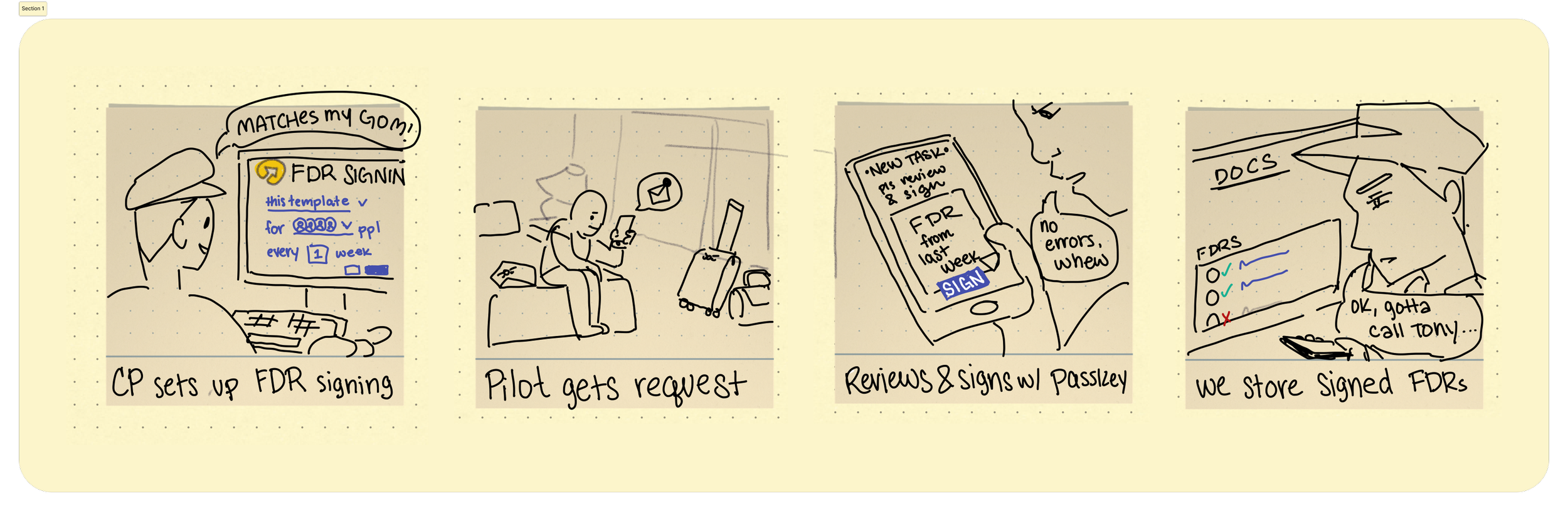
Pictured: I drew up storyboards to socialize how I understood compliance changing the pilot workflow. Note audit logs being out of scope — we didn’t realize how important that part was.
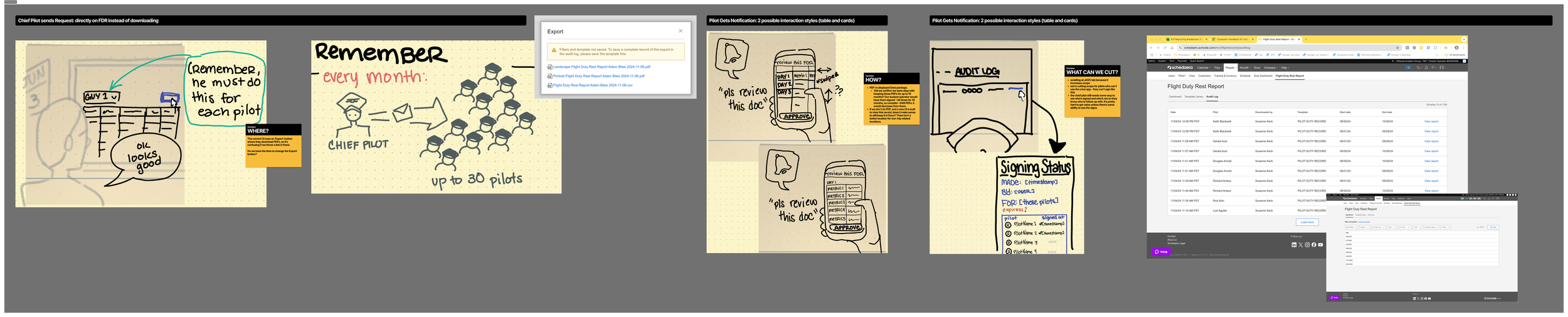
Pictured below: Artifacts I drew up when considering an alternative first record to add signatures. We ended up pushing it for a v2 because it required multiple parties to sign off, an added complexity.
UX Methods
We spent three quarters on this project. Here's how it unfolded:
Quarter 1: Research and exploration
We considered partnering with Dropbox to embed their digital signature tool into our flight logs. This seemed like a clear path to meeting the "electronic signature" requirement.
Cost and storage didn't work out, so we pivoted.
Our iOS developer suggested using passkeys instead—a secure, device-based authentication method. Since pilots primarily used the crew app to submit logs, this felt like a good fit.
Quarter 2-3: Design and development
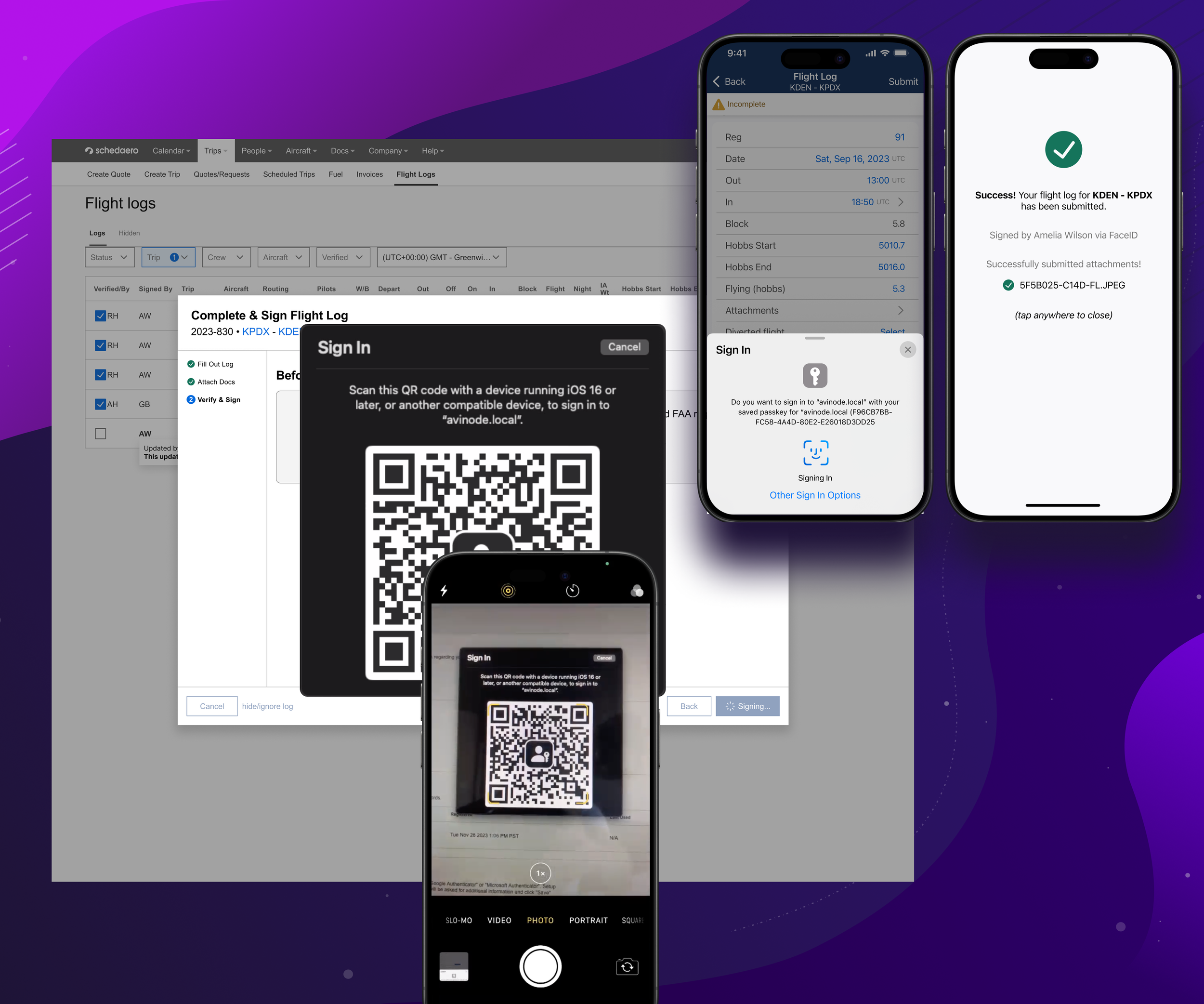
I designed a multi-step wizard that could wrap any form (starting with flight logs) and add a "passkey signature" step at the end.
The wizard was built to be reusable—we could apply it to other forms later.
I solved for edge cases: multiple submissions, multiple devices, shared accounts, resubmitting previously completed logs, and tracking admin edits on web.
I designed version history storage so we could see who had signed each version of a flight log.
The devs spent a quarter building the backend infrastructure to support passkey authentication and version tracking.
As part of this work, we also modernized the flight logs in React, which took longer than expected but cleared significant tech debt and prepared the foundation for future improvements.
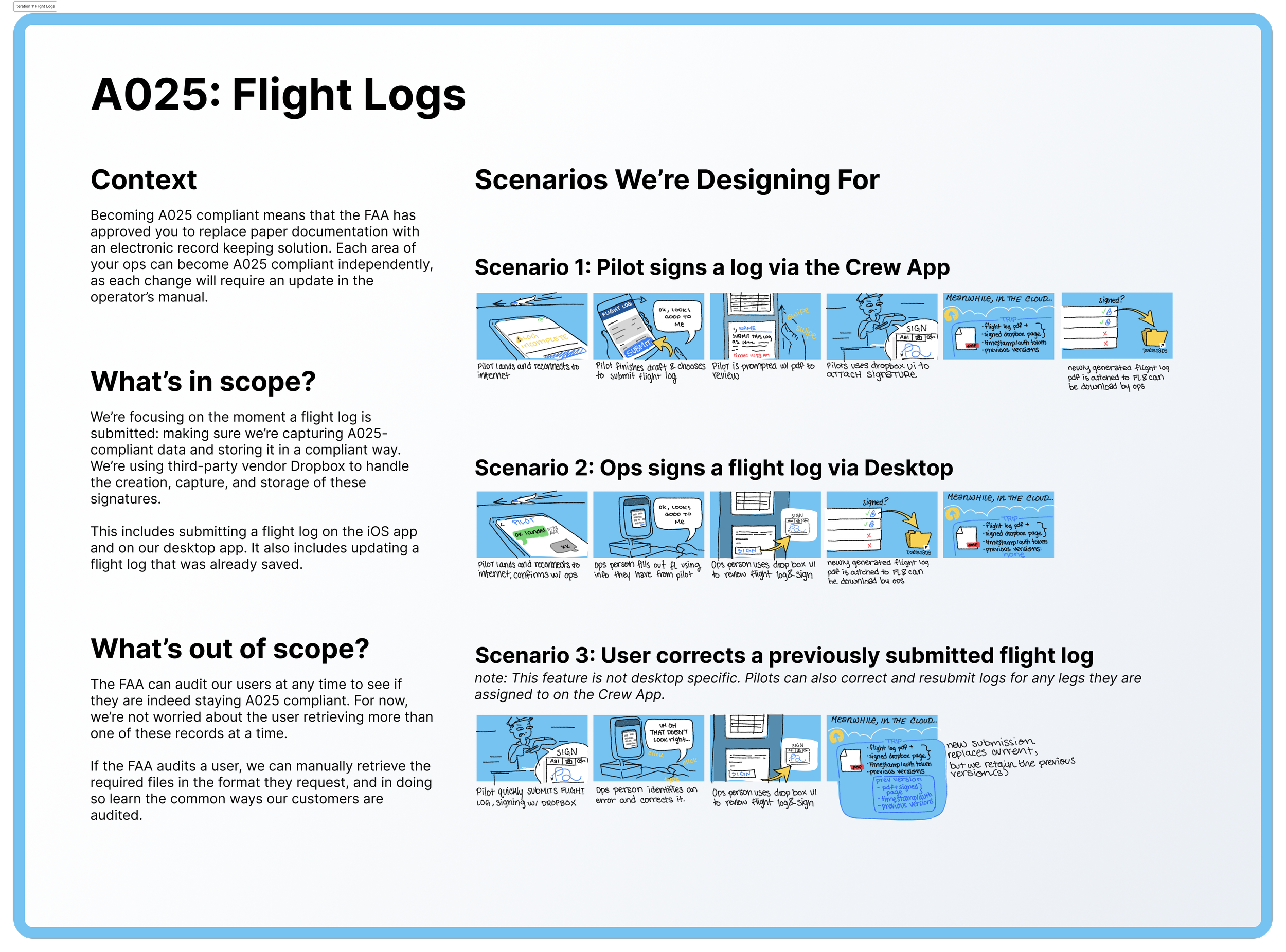
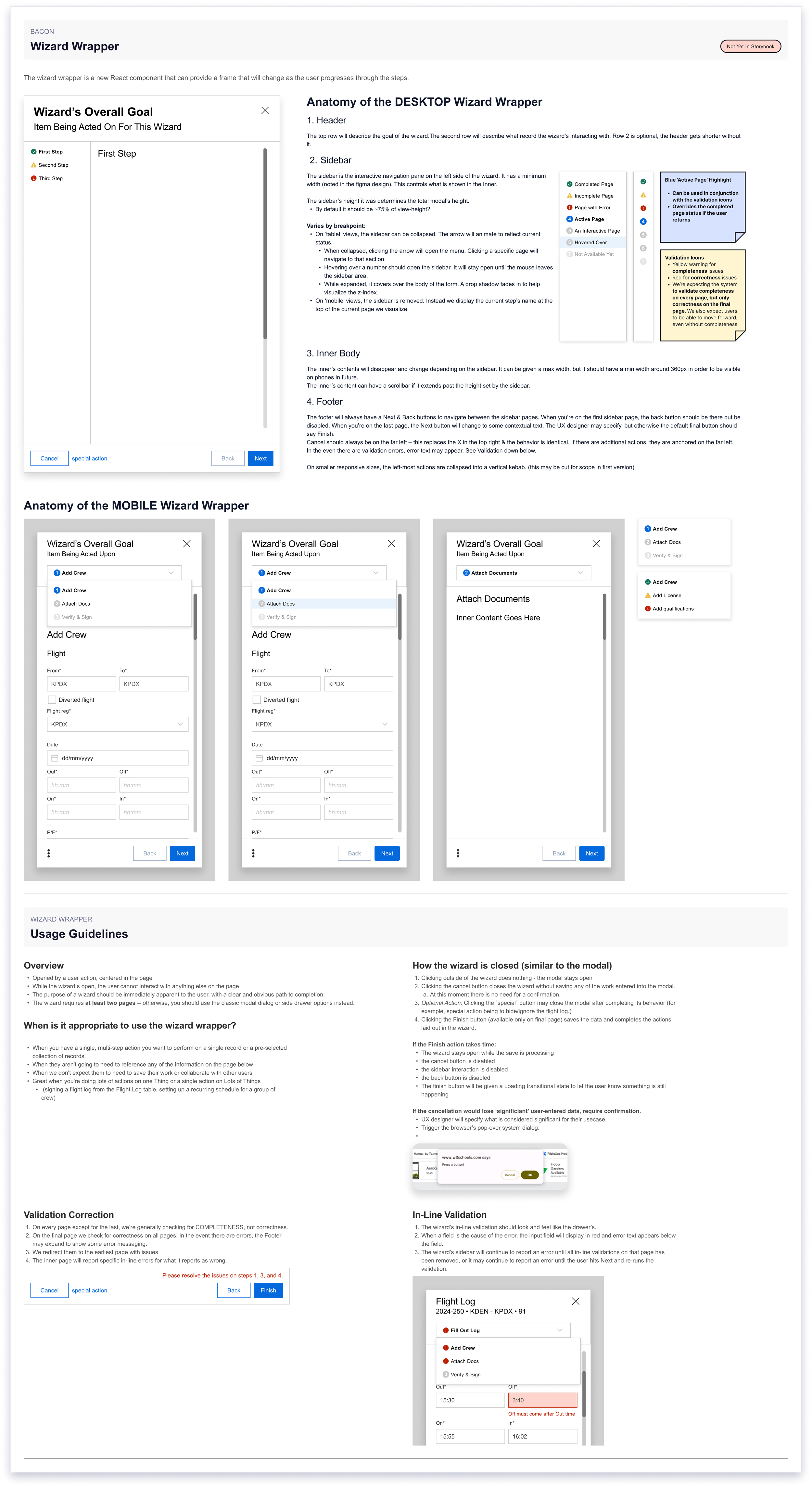
Pictured nearby: I drafted up documentation for best practices of the wizard so it could become part of the design system and other designers could use it for their own purposes
Late Quarter 3: The conversation that changed everything
Once the feature was built and in QA, we finally connected with a POI from the Portland office.
We showed them our passkey system. Their response: "This is good, but it's probably overkill."
They explained that the FAA typically considers logging in with a credentialed account (which we already had, with 2FA!) as sufficient for "signing" a record. The key was audit logs—being able to show who submitted what and when.
We didn't need passkeys. We didn't need a signature workflow. We just needed better version history.
This was an "oh, shit" moment. Suddenly it made sense why our competitor was claiming A025 compliance with just a 4-digit PIN code. The regulation wasn't asking for a wet signature or even a digital signature—it was asking for accountability and traceability.
The thing we built wasn’t needed to solve this problem. Now what?
UX Solutions
The Passkey Wizard (What We Built)
I designed a multi-step wizard that guided users through signing a flight log with a passkey. The wizard could wrap any form, making it reusable across the platform.
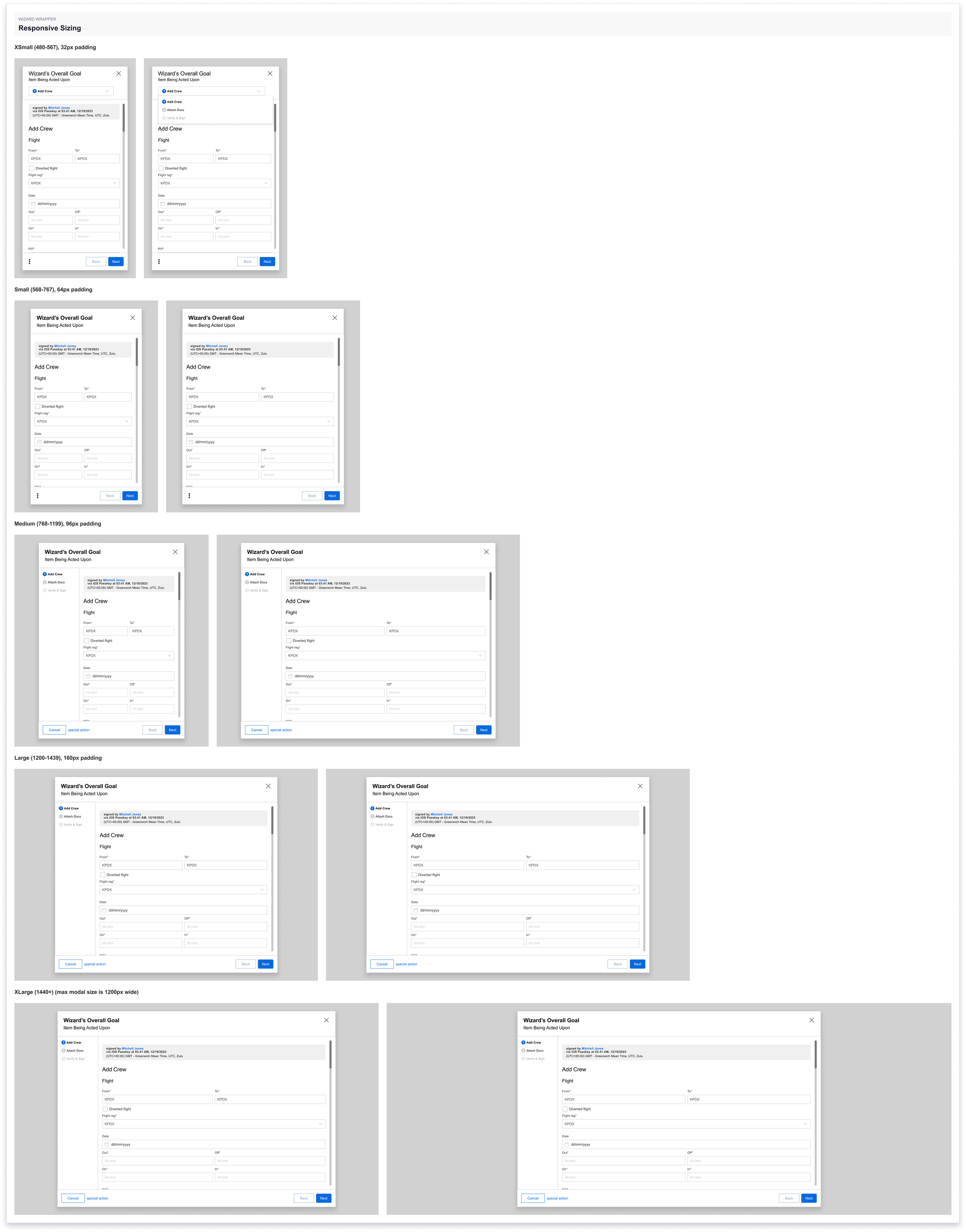
Pictured: The wizard’s responsive capabilities would make it useful for future modern workflows
Key design decisions:
Multi-device support: Pilots could sign from their phone or iPad, and admins could sign from web when making edits.
Version history: Every time someone signed a log, we stored a new version with their account info, timestamp, and changes made.
Edge case handling: If a pilot tried to resubmit a log that was already verified, the system would prompt them to create a new version instead of overwriting.
The problem: The workflow added 6+ clicks to the submission process. It was secure, it was compliant, but it was too much friction for a task pilots did multiple times a day.
What Actually Got Shipped
The feature was fully built and released. But no one adopted it.
Here's why:
The passkey workflow added too many clicks compared to the existing flow
Customers would have had to update their General Operations Manual (GOM) to start using this method, which is a bureaucratic lift
No one wanted to be the first to try it—everyone was waiting for someone else to validate it with their POI first
My PM was supposed to cultivate relationships with customers who were eager enough to be development partners—people who'd test it with us, sit in on POI meetings, and help us understand the documentation process. She'd come from a previous role where wet signatures were required for compliance, which may have influenced how we interpreted the regulation. Without champions willing to be first adopters, the feature languished.
Pictured: interactive prototype I created to test increased friction in workflow
What We Salvaged
Even though the passkey system didn't get adopted, we salvaged valuable work from this project:
The wizard component was reusable and eventually got applied to a maintenance onboarding flow, proving its value in a different context.
The flight log modernization was an unexpected silver lining. Rebuilding flight logs in React cleared significant tech debt and laid the groundwork for future improvements across the platform.
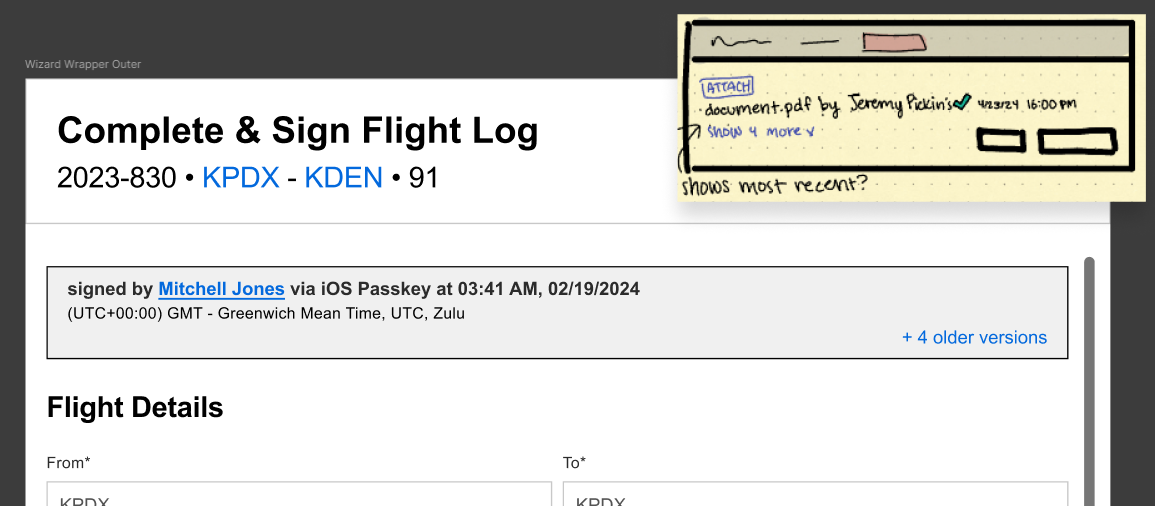
We also improved our audit logs and version history based on what we'd learned from the POI. Those improvements shipped to everyone, though we didn't get much feedback on them. A few customers did end up getting Schedaero listed in their A025 documentation, but they did it on their own—without using the passkey feature.
Pictured: improved audit logs were implemented throughout the site
Outcomes & Impact
This project didn't succeed in the way we intended, but it taught me more than most of my "successful" projects.
What happened:
We spent 3 quarters building a passkey-based signing system
We discovered late in the process that we'd misinterpreted the regulation
The feature shipped but wasn't adopted due to workflow friction and lack of customer buy-in
We salvaged the wizard component (used later in maintenance onboarding) and cleared tech debt by modernizing flight logs
What I learned:
1. Validate regulatory interpretations early with multiple experts.
We relied on our own interpretation of A025 for too long. I should have pushed to consult a legal expert or multiple POIs before we started designing, not after we'd already built the system. Regulations are ambiguous on purpose—you need external validation to know you're on the right track.
2. Call 3-5 experts, not just one. And use the phone, not email.
I emailed a couple of POIs early on but didn't get responses. I later learned that aviation is a phone-call industry—people are more willing to help if you call. If I had a time machine to fix this, I also would have called POIs in different regions near where our customers were located, since interpretations can vary by office.
3. Trust your gut when a workflow feels too complex.
Our passkey flow required 6+ clicks. I knew it felt like too much, but I didn't push back hard enough because I thought passkey was a constraint I had to work around. If a design feels overly burdensome for a frequent task, that's a red flag. I should have flagged this earlier and insisted we validate whether all that complexity was actually necessary.
4. Take ownership of research, even when it's "someone else's job."
I assumed my PM was handling the regulatory validation. She wasn't. I should have taken the reins and done the boots-on-the-ground research myself—calling POIs, talking to customers, understanding the documentation process. Waiting for someone else to do it cost us three quarters.
5. Lightweight validation beats heavy investment.
We could have written a one-page proposal and shown it to a POI in week 2. Instead, we spent months designing and building before seeking external validation. Next time, I'd create a lightweight prototype or written spec and validate it with experts before committing to development.