Eliminating #1 User Complaint by Digitizing Paper Logs
ROLE & TEAM
Product Designer at Schedaero. Worked with a PM, 2 iOS Engineers, and API Engineers. Consulted regularly with another Product Designer.
SUMMARY
I designed and shipped a comprehensive offline mode for our crew app over the course of three years, evolving from a simple draft feature to a full offline queue that handled flight logs, expenses, and duty logs—eliminating the #1 user complaint and boosting our Customer Effort Score from 3.8 to 6.5.
Problem Statement
Pilots work in environments where connectivity is unreliable—in the air, on tarmacs, in remote locations. But our crew app required an internet connection to save work. If pilots lost connection mid-task, they'd lose everything they'd entered.
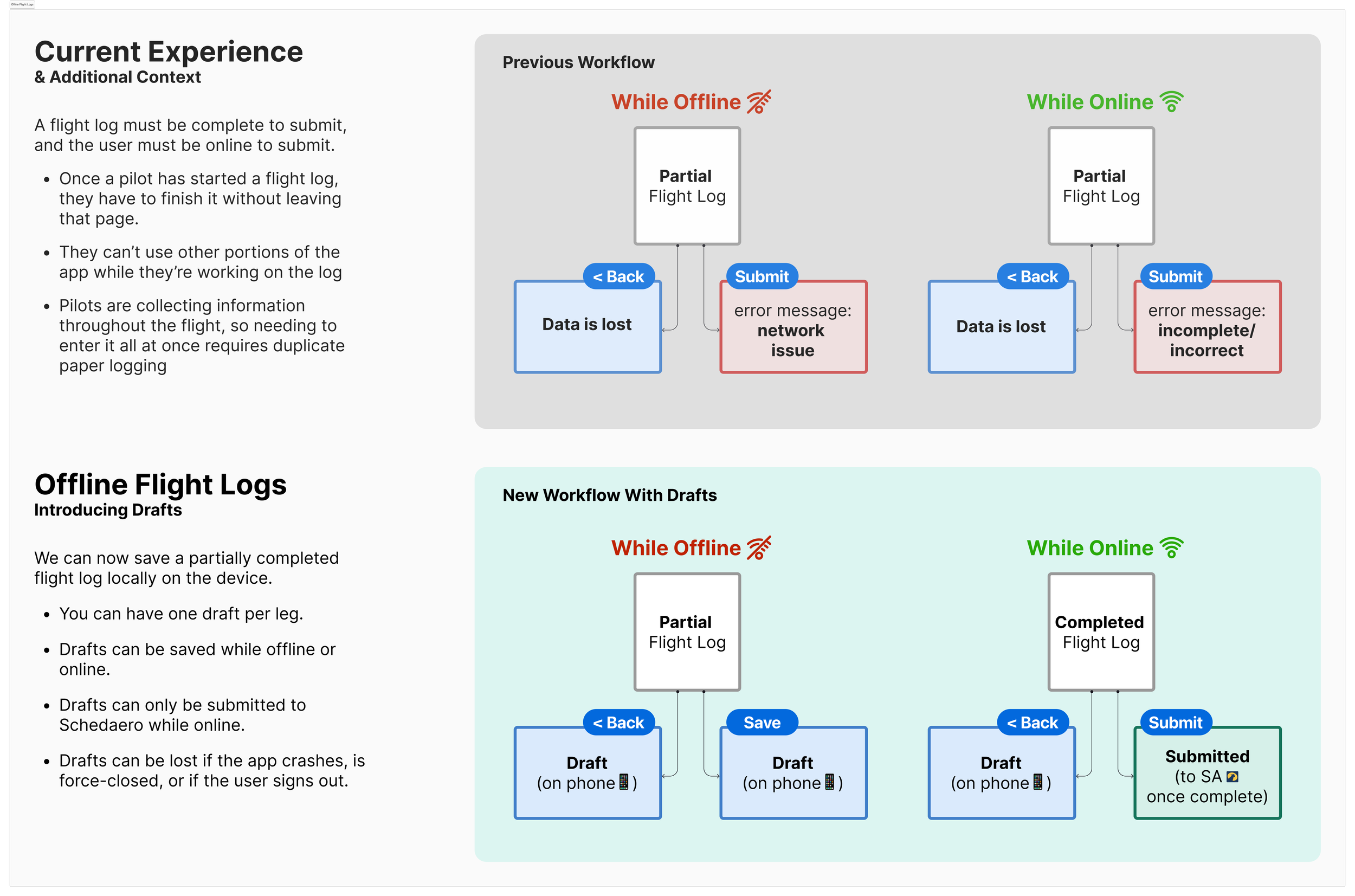
This was especially painful for flight logs, which are long, detailed forms. Before we had offline capabilities, pilots had to fill out paper logs and manually transfer them to the app later when they had internet. It was double the work, and it defeated the purpose of having a digital tool.
In my first quarterly feedback report after joining the team, over half of the feedback mentioned offline capabilities.
We also saw it in App Store reviews and support tickets. It was the #1 pain point, and it was costing us user trust.
Project Goals
Allow pilots to save partial flight logs without requiring a single sitting or internet connection
Let pilots submit expenses, duty logs, and other quick forms offline and sync them when connection returns
Create a persistent queue where pilots could manage all their offline submissions in one place
Systematically eliminate offline-related complaints by addressing the highest-priority pain points first

UX Methods
We had limited engineering capacity—just two iOS developers—so we couldn't build everything at once. Instead, we prioritized ruthlessly based on user feedback.
While the team was also busy modernizing the app's tech stack (migrating to SwiftUI, implementing landscape mode, and redesigning the homepage), I focused on systematically solving offline pain points by analyzing quarterly CES (Customer Effort Score) surveys, support tickets, and App Store reviews.
Flight logs were the clear winner: they were long, complex, and pilots had to complete them. So we started there. As we shipped improvements, the feedback shifted. Once flight logs were solved, complaints about expenses and duty logs bubbled up. We methodically tackled each pain point in order of impact, fitting offline improvements into the roadmap alongside other high-priority features.
I worked closely with:
Two iOS engineers to understand technical constraints and design within them
API engineers to structure backend logic for syncing and conflict resolution
My PM to prioritize features and manage scope
The other UX designer for gut checks and feedback throughout
We tested frequently with pilots, shipped iteratively, and measured success by watching complaints disappear.
Pictured: flight log form that pilots had to complete in a single sitting
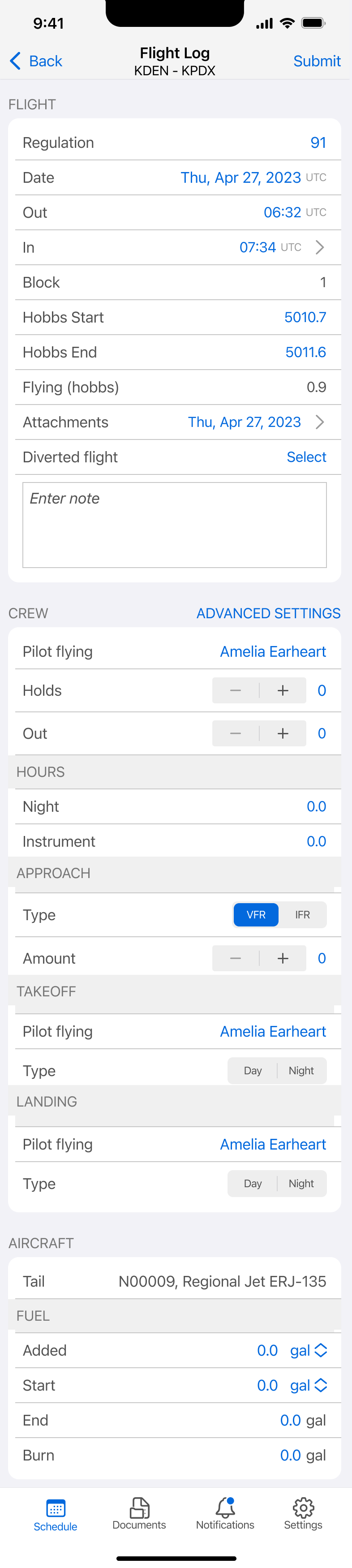
Pictured: artifact I drafted to communicate with engineers when negotiating backend feasibility
Key Focus Areas
How might we let pilots save partial work without requiring internet?
How might we handle sync conflicts when multiple people edit the same flight log?
How might we give pilots visibility into what's queued, what's synced, and what needs attention?
How can we design for edge cases—like force-closing the app or working across multiple devices—without overcomplicating the experience?
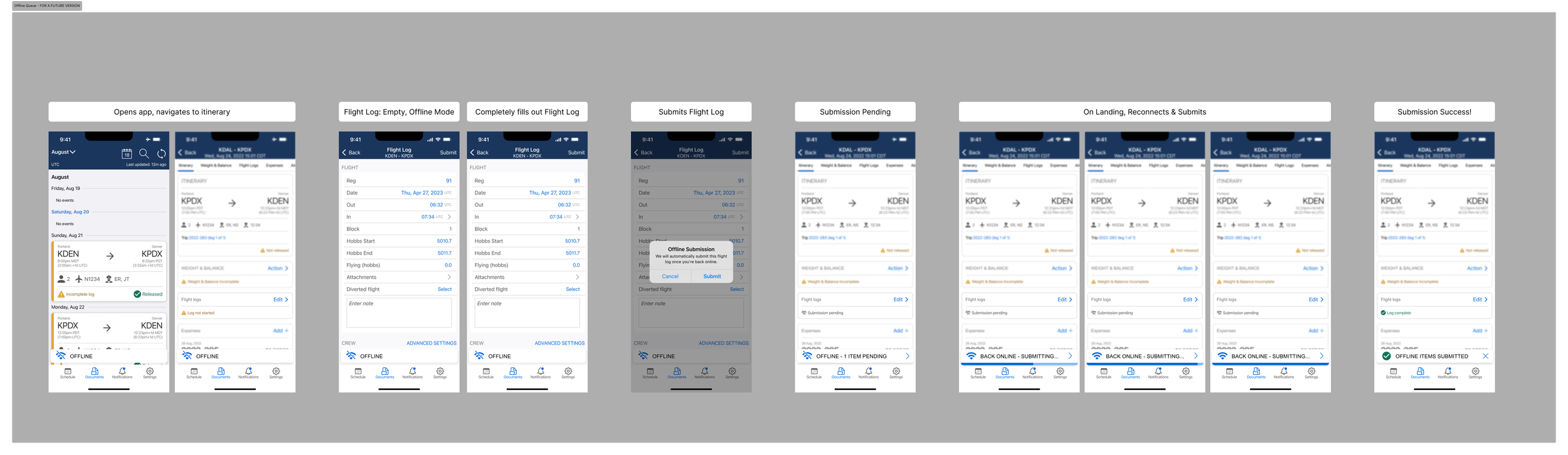
Pictured below: Workflow for adding submission to a queue. I ended up removing this feature in the first version, but we implemented it in a later version.
UX Solutions
Iteration 1: Draft Mode for Flight Logs
Flight logs were the biggest pain point, so we started there. The problem: pilots couldn't save partial work. They had to complete the entire log in one sitting, or start over.
The solution: I designed a draft mode that let pilots save their progress locally and return to it later.
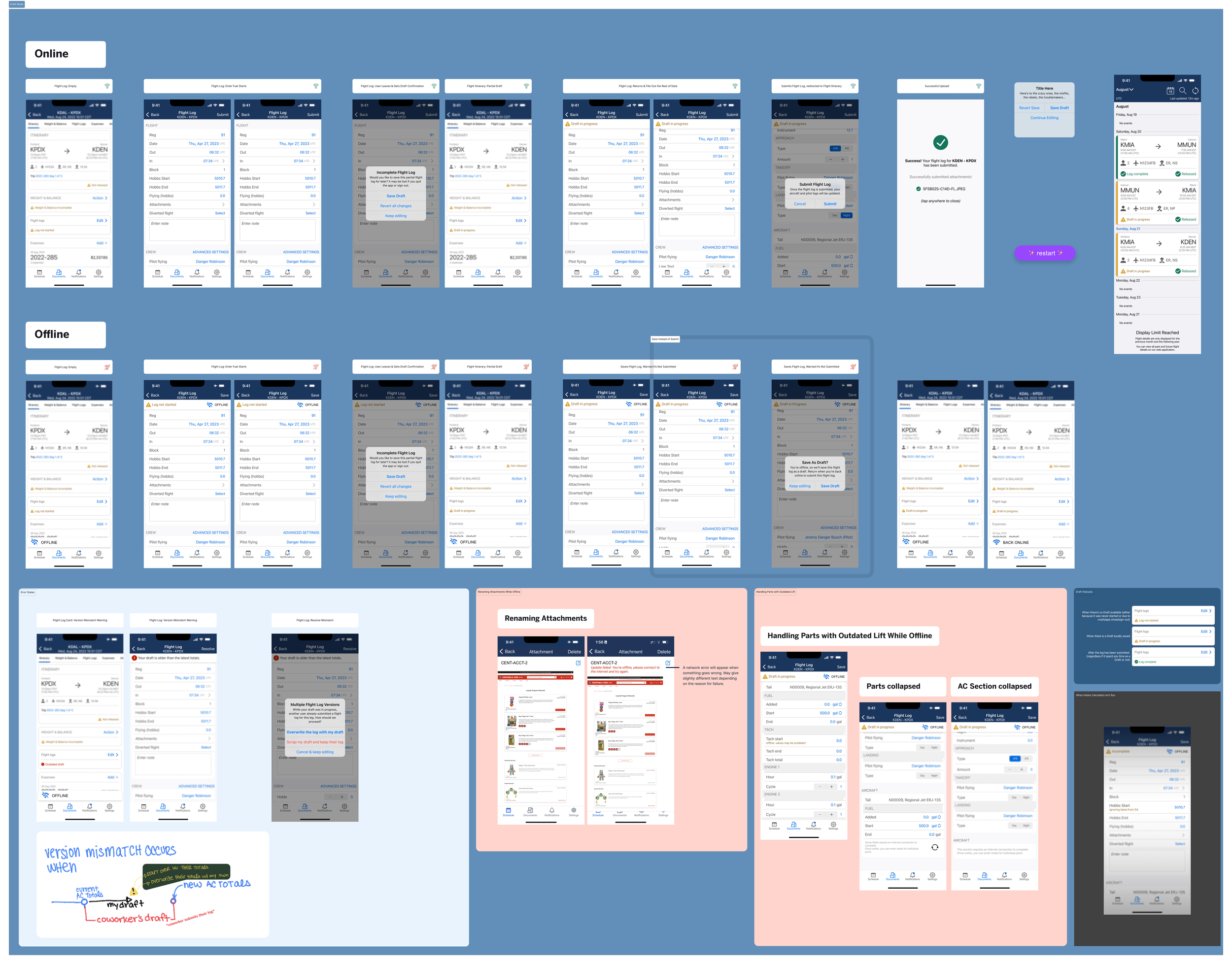
Pictured: The modal that would appear when users tried to abandon a flight log
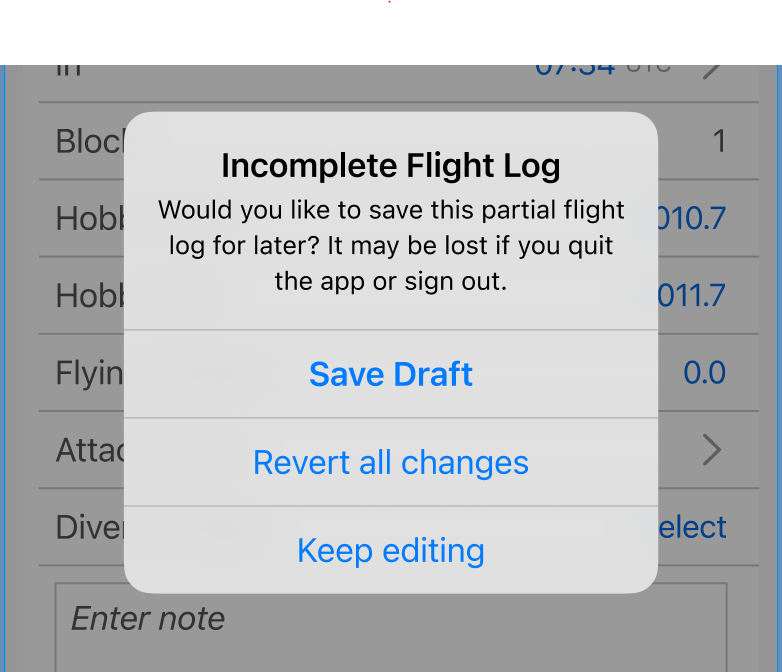
Key design decisions:
Single-device drafts: We limited drafts to one device to avoid sync conflicts. Pendo data showed most pilots only used one device anyway, so this was an acceptable tradeoff.
Session persistence: Initially, drafts only lasted one session—if the app crashed or was force-closed, the draft was lost. This was a technical limitation we had to accept in v1, but we addressed it in later iterations.
I also designed a status bar pattern that appeared at the top of the flight log to indicate its current state: draft, submitted, syncing, locked (if verified by another user), or conflict detected. This gave pilots constant visibility into what was happening with their data.
Pictured below: Variants of the status ribbon


User response: Pilots could finally fill out logs the way they filled out paper logs—a little at a time, as information became available. The complaints about losing work in the air dropped significantly.
Fun fact: We discovered some pilots were force-closing the app frequently, which deleted their drafts. We initially considered a Pendo guide to warn users about this behavior, but ultimately didn't need it—the issue resolved itself as pilots adjusted their habits. We did actually email a single customer who was particularly egregious, though.

Iteration 2: Offline Queue for Expenses and Duty Logs
Once flight logs were solved, feedback shifted to other forms: expenses, duty logs, and weight & balance calculations. These forms were much shorter than flight logs, so pilots didn't need a draft mode—they just wanted to fire them off into a queue and forget about them until they had internet.
The solution: I designed an offline queue that let pilots submit forms even without connection. The app would hold them locally and sync them automatically when internet returned.
Key design decisions:
Fire-and-forget interaction: Unlike flight logs, these forms didn't need draft states. Pilots could complete and submit them in one go, and the app would handle the rest.
Conflict resolution logic: I worked with engineers to define rules for what happened if someone submitted a flight log that had already been verified by another user. We created checks to prevent duplicate submissions and locked verified logs to avoid accidental edits.
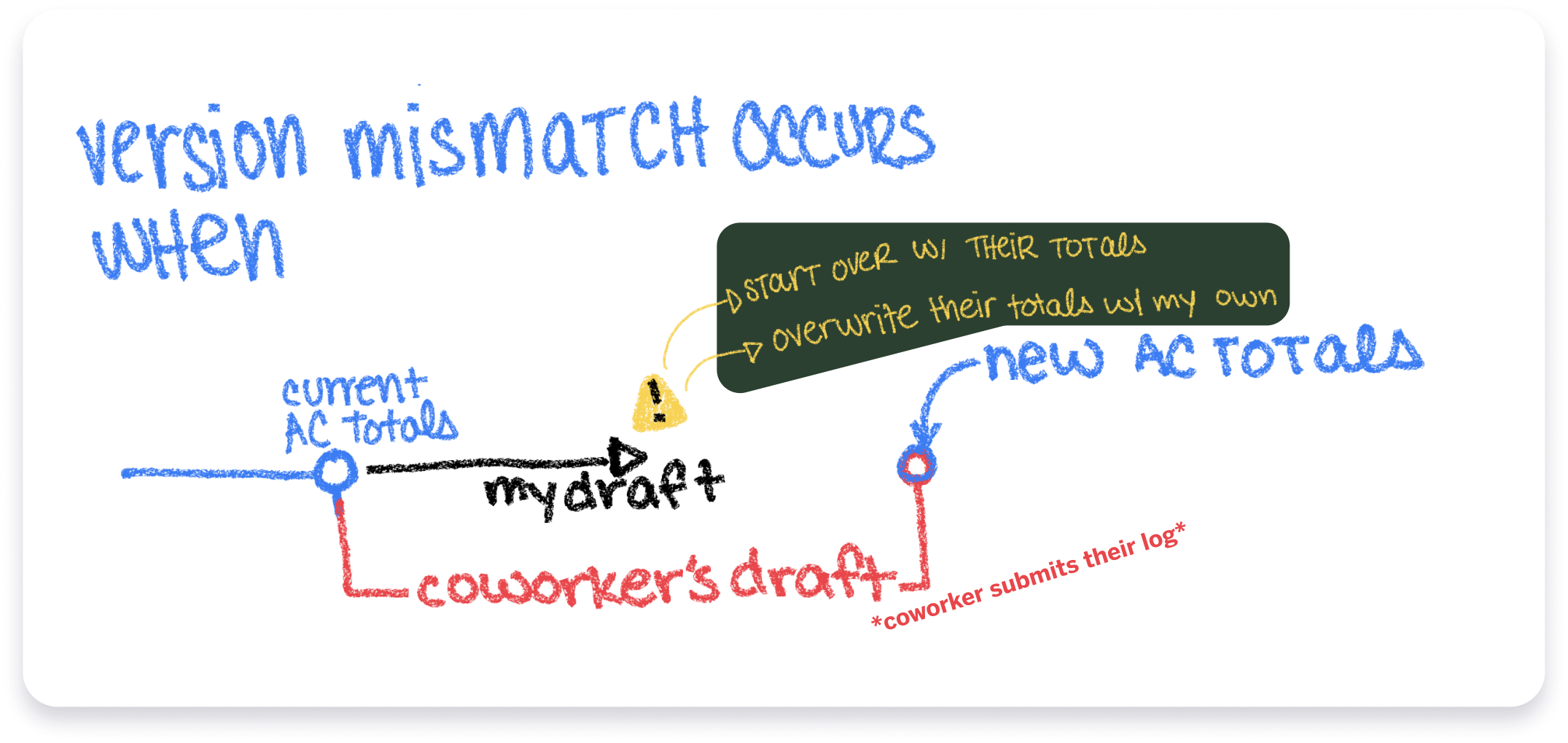
User response: Mentions of offline issues for expenses and duty logs in CES surveys dropped to nearly zero. Pilots could work seamlessly offline, and the app just worked.
Iteration 3: Persistent Offline Queue
By this point, we had draft mode for flight logs and offline submission for other forms—but they were managed separately. Pilots wanted one place to see everything they'd submitted offline and manage it all in one view.
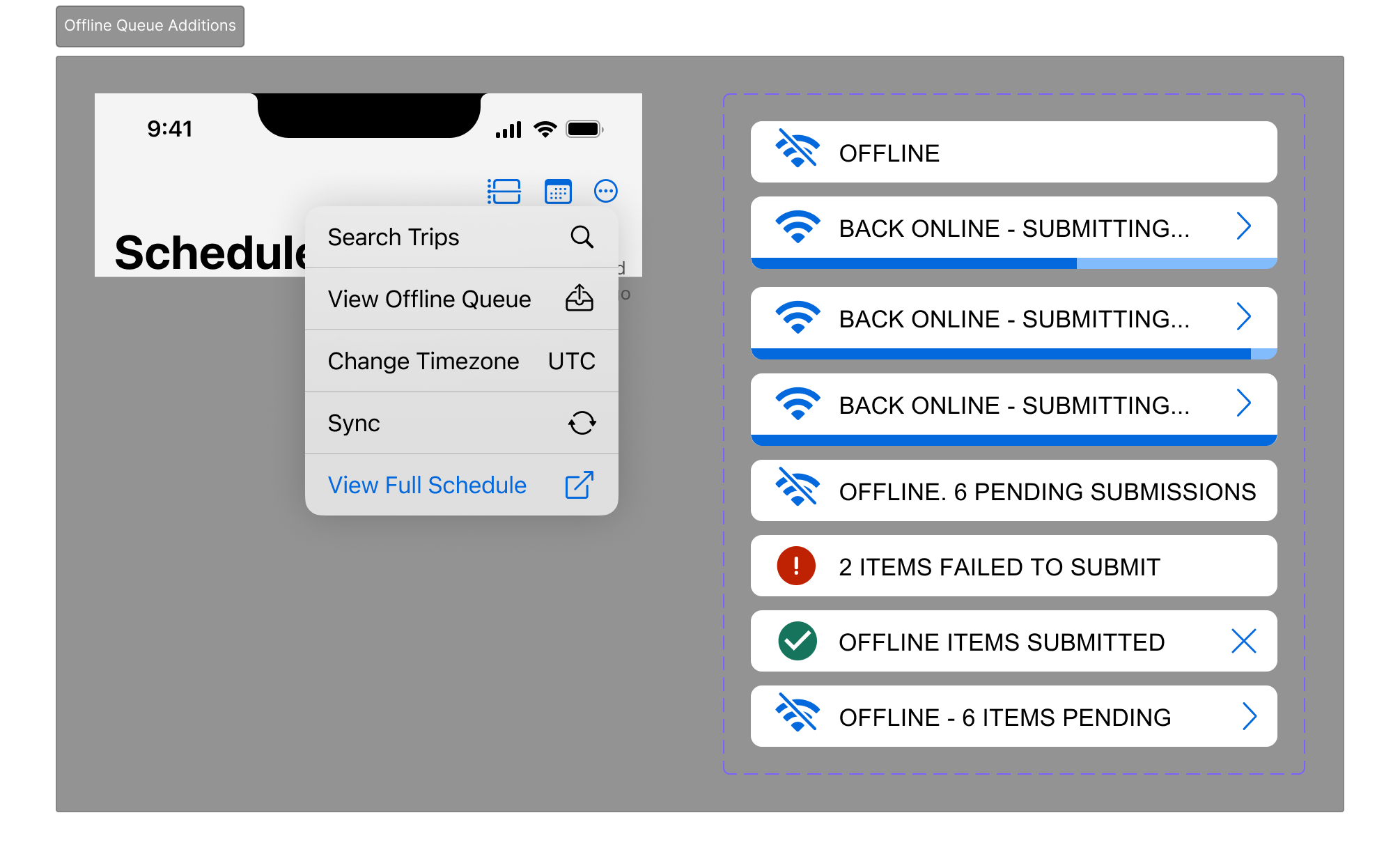
The solution: I designed a persistent offline queue that surfaced all pending submissions—flight log drafts, queued expenses, queued duty logs—in a single, scannable list.
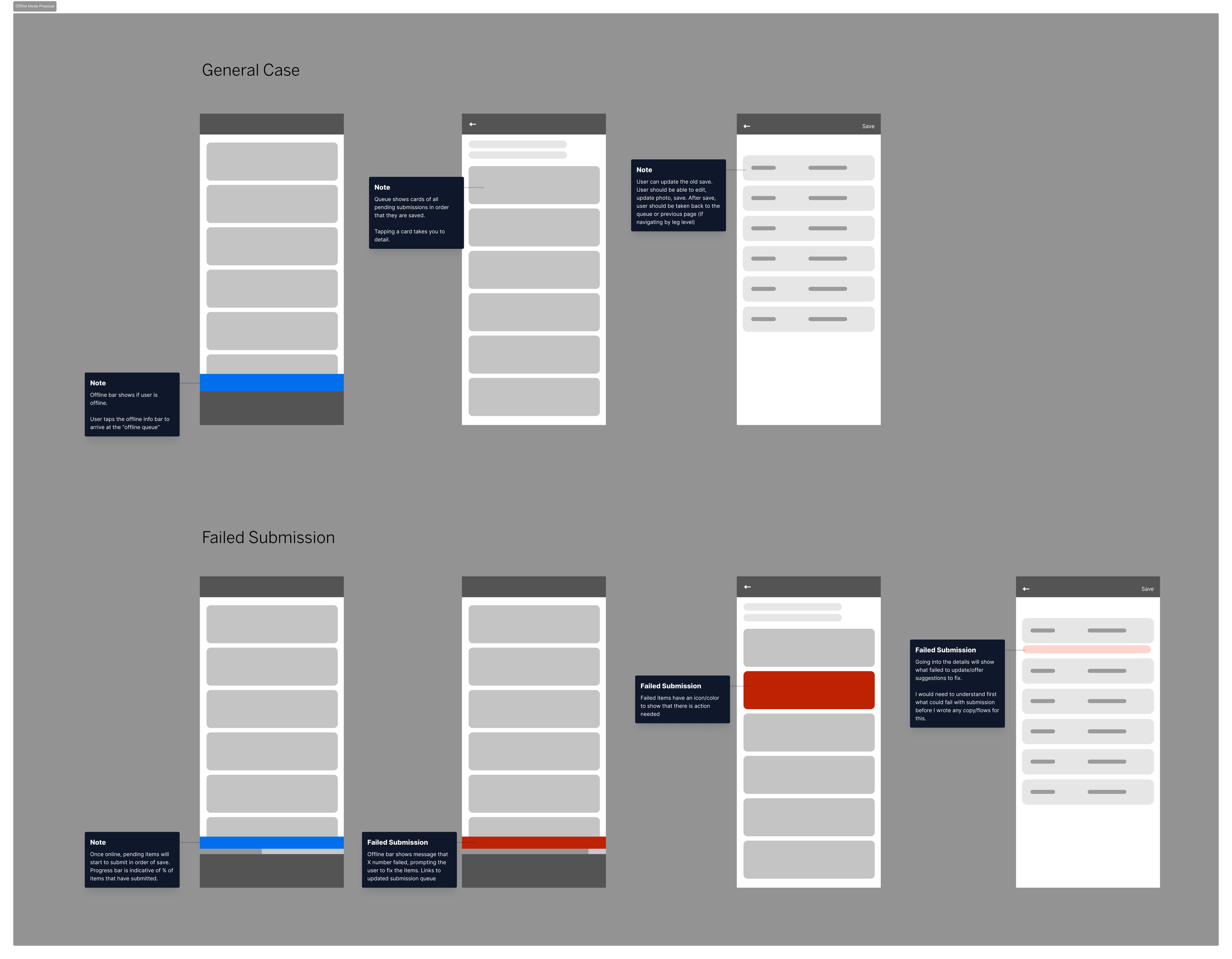
Key design decisions:
Clear status indicators: Each item in the queue showed its current state (draft, queued, syncing, synced, error).
Edit and delete actions: Pilots could tap into any queued item to edit or delete it before it synced.
Graceful error handling: If a sync failed (e.g., due to a conflict or validation error), the queue surfaced the issue clearly and let pilots take action.
User response: This was in active development when my time with the company ended, but early testing showed pilots immediately understood the interface and appreciated having a single source of truth for their offline work.
Outcomes & Impact
Over three years, we systematically eliminated offline-related complaints by shipping iterative improvements based on user feedback. The results speak for themselves:
Quantitative impact:
CES (Customer Effort Score) jumped from 3.8 to 6.5—a massive improvement in perceived ease of use
75% of iOS crew app users (908 visitors across 121 accounts) used offline functionality in a 90-day period, generating over 80,000 offline events
Feedback mentioning offline capabilities dropped to virtually zero after the improvements shipped
Qualitative impact:
Pilots stopped complaining about losing work in the air
Support tickets shifted from "I can't save my work" to minor issues like form auto-calculations (a much smaller problem)
Pilots could finally work the way they actually worked—logging incrementally, submitting on the go, and trusting the app to handle the sync
What I learned:
Prioritization is everything. With limited engineering capacity, we couldn't build everything at once. By ruthlessly prioritizing based on user feedback, we tackled the highest-impact problems first and let the roadmap evolve as complaints shifted.
Constraints breed creativity. We couldn't support multi-device drafts or persistent sessions in v1, but by designing within those constraints (and validating that most users didn't need them), we shipped a solution that worked for 75% of our users.
Silence is success. The best outcome wasn't glowing praise—it was that pilots stopped mentioning offline mode altogether. When a feature works seamlessly, it becomes invisible. That's the goal.